

Today’s newsletter is sponsored by Xplor Pay. In their latest case study, they show how a POS provider embedded payments using PayFac as a Service without taking on the burden of compliance, risk, or merchant onboarding.

Learn how white-labeled payments, streamlined setup, and flat-rate pricing helped the platform improve the experience while unlocking new recurring revenue. Read the full case study.
Alright, let’s get to it…
The Only Non-BS Way to Decide Which AI Agents to Add to Your vSaaS
Everyone wants “AI agents” in their product right now.
Most teams ship a chat box, call it an agent, and then… nothing changes. Usage is cute. Retention doesn’t move. Nobody’s day actually gets easier.
Build your agent roadmap by ranking “automation level” per role (not by vibes)
The first step is actually building a standard org chart for the customers you serve.
Map out EVERY single job/role at your ICP. This should include the Title, the full job description, the compensation, and the specific milestones/quantitative goals they are responsible for achieving.

1) Build your AI Agent roadmap by ranking the level of automation you can achieve per role
The question is not “which role can we automate end-to-end?”
The question is: for every role that touches your product, what level of automation can you credibly deliver—and how fast can you move that role up the automation ladder? Then you force-rank the roadmap based on those deltas.
This works especially well in vertical SaaS because vertical agents can actually bake in domain rules, compliance constraints, and industry jargon that generic models miss. That’s the point of “vertical AI agents.”
Step 1: Map the customer org chart (the workflow lives in the handoffs)
Start by mapping the org chart for your ICP account type, not just “the user.”
You’re looking for:
who generates inputs
who transforms inputs into records
who approves/rejects
who gets blamed when it’s wrong
If you sell into construction, that might be Supers, PMs, VDC, PE’s, owners. If you sell into logistics, it’s dispatch, ops, billing, customer service. If you sell into healthcare ops, it’s front desk, MA, coding, prior auth, billing.
Why this matters: agents don’t create value in isolation. They create value when they reduce coordination cost across roles (handoffs, “what’s true?”, “who owns this?”, “where’s the proof?”).
Step 2: Write a job description for every role (this is where agents hide)
Yes. Write the job descriptions.
Not HR-perfect. Operator-real.
For each role, capture:
what they’re accountable for (KPIs)
what they do daily/weekly
what decisions they own
what artifacts they produce (reports, logs, packets, approvals)
what failure modes create rework, disputes, delays, or compliance risk
This turns “we should add agents” into a finite set of workflows with definitions of done.
Step 3: Put each role on an “Automation Ladder” (LoA) and score it
Here’s the ladder (use this exact thing in a spreadsheet):
LoA 0 — Manual
The role is meetings, tribal knowledge, and ad-hoc work.
LoA 1 — Retrieve & explain (read-only)
Agent can answer questions, find context, summarize history.
LoA 2 — Draft artifacts
Agent drafts real deliverables: emails, daily logs, status reports, inspection packets—with citations back to source records.
LoA 3 — Recommend decisions
Agent flags exceptions, recommends approve/reject/prioritize, explains why.
LoA 4 — Execute with guardrails
Agent updates records, routes work, requests missing info, triggers workflows (with policies/approvals).
LoA 5 — Closed-loop outcomes
Agent completes the workflow end-to-end and handles most exceptions.
Now score each role on two dimensions:
Ceiling: what LoA is realistically achievable in 12 months given your data + permissions + integrations?
Speed: how fast can you move the role up 1–2 levels?
If you do this honestly, you’ll find something surprising: a lot of roles can jump from LoA 0 → LoA 2 quickly (drafting artifacts is an immediate win), while only a few can safely get to LoA 4 early (execution needs guardrails + trust).
Step 4: Force-rank your agent roadmap using “LoA Delta × Frequency × Blast Radius”
This is the “stop arguing” formula.
For each role:
Current LoA
Target LoA in 90 days
Target LoA in 12 months
LoA Delta
Frequency (daily, weekly, monthly)
Blast Radius (how many downstream roles depend on the output)
Then force-rank your roadmap by:
Roadmap Priority Score = (LoA Delta) × (Frequency) × (Blast Radius)
That’s how you avoid building “cool agents” and instead build the ones that become operationally unavoidable.
Step 5: Turn your top 3 roles into “Agent Job Stories” (not feature lists)
For your top 3 roles, write job stories like:
“When it’s Thursday and I need to approve invoices, I want an evidence-backed packet that shows what’s complete, what’s missing, and what’s risky—so I can approve or reject quickly.”
“When an inbound request hits the queue, I want it classified, deduped, enriched, routed, and tracked—so nothing slips.”
Notice what’s consistent: a trigger, an outcome, and a decision.
Step 6: Define the “Agent Contract” (this is what makes it sellable)
Every agent you ship should have an explicit contract:
Inputs
Where it pulls data from (your SoR objects + integrations).
Outputs
What it produces (and what “done” means).
Citations
Links back to source records (this is trust).
Guardrails
What it will never do automatically.
Write-backs
Which objects it creates/updates in your system of record.
This is the difference between “AI demo” and “workflow product.”
Step 7: Ship the trust ladder (Draft → Recommend → Execute)
Here’s the rollout pattern that works in real vertical ops:
Draft (LoA 2): generate artifacts with citations
Recommend (LoA 3): propose decisions + highlight exceptions
Execute (LoA 4): take actions with policies + approvals
Close-loop (LoA 5): only when your exception handling is real
If you try to skip to execution, you’ll get blocked by risk, permissions, and “what if it’s wrong?” politics.
Step 8: Examples of actual jobs (and the agents that map cleanly)
To make this real, here are actual job archetypes that show up in most operational verticals, and why they score high on automation potential:
1) Intake & Triage Coordinator
Their day is routing, deduping, filling missing fields, chasing attachments, and assigning ownership.
Agents here jump fast because “done” is crisp: a clean record exists, assigned, with next steps.
2) Status Translator (the “nobody trusts the truth” role)
They pull from 3–7 systems and produce the weekly narrative for leadership/customers.
Agents win here at LoA 2–3 because drafting + exception flagging saves real time and reduces surprise.
3) Evidence Packet Builder
They compile proof for approvals, compliance, billing, audits, disputes, inspections.
Agents here deliver immediate ROI at LoA 2: a source-linked packet + what’s missing + what’s risky.
4) Scheduler / Dispatcher
They coordinate people/assets against constraints (availability, location, priority, SLAs).
This often starts at LoA 3 (recommendations) and grows into LoA 4 execution with guardrails.
5) Compliance / Audit Coordinator
They track obligations, deadlines, control evidence, and audit trails.
Agents do well here because the work is artifact-heavy and rule-heavy (vertical knowledge matters).
Step 9: Your “copy/paste” worksheet
Create a table with columns:
Role
KPI / accountability
Recurring artifacts produced
Current LoA
Target LoA (90 days)
Target LoA (12 months)
LoA Delta
Frequency
Blast Radius
Top 3 integrations needed
Guardrails needed
Metric that proves ROI
Fill this out for 10–20 roles and your roadmap will basically write itself.
Step 10: Success metrics (what to measure so you don’t fool yourself)
If you want to know whether the agent is real, track:
Cycle time reduction (time-to-close, time-to-approve, time-to-route)
Artifact completion rate (reports/logs/packets created on time)
Exception resolution rate (how many issues caught early vs late)
Adoption in the role (not overall MAU—role-specific penetration)
Downstream impact (fewer disputes, fewer escalations, fewer missed steps)
If you can’t tie your agent to one of these, it’s a demo.
Let me know how this goes. I’ve been doing this with a few companies and it has been so eye opening for us…

The Story of Drone Deploy— from “drone mapping app” to “agentic site intelligence platform”
DroneDeploy is one of those companies that’s easy to misunderstand if you freeze them in time.
If you met them in 2016–2018, you’d call them “drone mapping software.”
If you look at them now, the better description is: a reality capture system-of-record with an AI agent layer that turns messy site conditions into decision-grade outputs (progress, safety, inspection). They literally describe it as “bring the site to you” using drones, robots, 360 cameras, and AI agents—and say they’re trusted by 5,000+ enterprises.
Here’s how they got there, and what you should steal.

The origin story: three founders, one obvious missing layer (software)
DroneDeploy was founded in 2013 at AngelPad by Mike Winn (CEO), Jono Millin (CPO), and Nicholas Pilkington (CTO).
What they saw early was simple: drones were getting adopted, but the “value” wasn’t the drone. It was what the drone produced: a map, a model, a repeatable way to see what changed.
So they built the software layer to plan flights, capture data, and turn it into usable outputs for industries like agriculture, construction, and insurance.
At the time, the company leaned into a SaaS model with a free tier and paid plans (CNBC noted premium plans starting at $99/month back then).
Early funding: Scale leads Series B as commercial drones open up
In 2016, DroneDeploy raised a $20M Series B led by Scale Venture Partners (with High Alpha participating), bringing total funding at the time to $31M.
What’s notable is why this round happened when it did: commercial drone regulations were tightening into something usable, and the “software control plane” became the obvious pick-and-shovel.
TechCrunch framed DroneDeploy as a platform used across a ton of industries to plan flights and produce detailed maps/3D models.
The strategy shift: “beyond drones” and a multi-modal product suite
This is where the story gets very vSaaS.
DroneDeploy didn’t stay trapped as “a drone app.” They expanded the capture modalities and built toward a unified record of site reality.
You can see the product suite turning into a platform:
1) Construction system-of-record motion
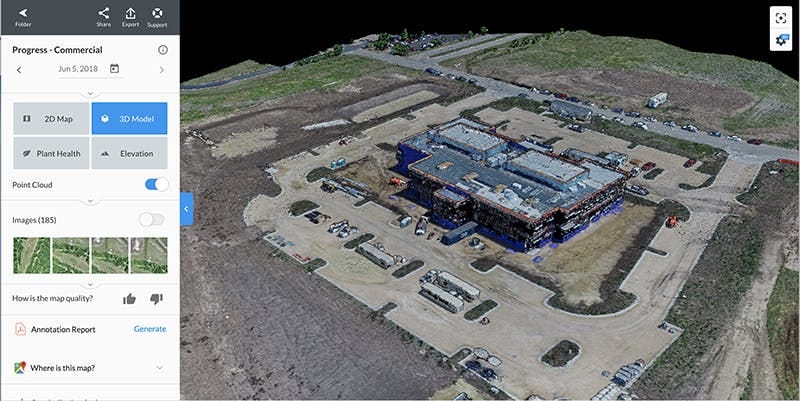
On the construction page, they position the platform as “one platform for all your site and photo documentation.” They explicitly talk about automatically organizing photos across the lifecycle, sharing annotated reports and 360 walkthroughs, and improving safety by inspecting hard-to-reach areas.
They also highlight integrations with Procore and Autodesk Forge (drawing sync, RFIs/observations, embedded app experience, photo archive), plus exports to tools like Navisworks and Revizto.
That’s important: they’re not trying to rip out the stack. They’re trying to become the “visual truth layer” the stack can reference.
A quote on the construction page captures the SoR ambition perfectly: “We finally have a single project management tool for all site documentation in one place.” (Austin Lay, STO Group).
2) Robotics and automation as the capture engine
Their Robotics product messaging is basically: schedule missions (docked drones + ground robots), automate collection + upload, then let AI add context. They frame it as “three solutions, one platform,” including Dock Automation and robotic walkthrough/inspection workflows.
3) Acquisition-led consolidation
In 2022, DroneDeploy announced it would acquire StructionSite to unify aerial + ground capture into one platform (interior + exterior).
They backed that strategy with real scale metrics: they said they’d mapped 300+ million acres and 1.7 million sites from 7.9 million flights and served customers across 190 countries.
And StructionSite brought its own gravitational pull: DroneDeploy said StructionSite customers captured $190B of construction volume, with 3x annual growth in active projects, and “over 500 builders” using the product.
Say whaaaaaaaat. That’s not “nice-to-have documentation.” That’s the beginning of a category: record the site, then run the business off the record.
Funding milestones: from “category leader” to “break-even + strategic AI/robotics funding”
DroneDeploy also has a long arc of funding that maps to their strategy evolution:
Series D (2019): They announced a $35M Series D led by Bessemer, bringing total funding to $90M.
Series E (2021): Energize noted it co-led DroneDeploy’s $50M Series E with AirTree, and said total capital raised hit $142M. Energize explicitly called out that the capital would help expand beyond aerial capture and pursue acquisitions.
2025: DroneDeploy said it reached break-even and raised a $15M strategic investment to accelerate AI and robotics (Progress AI, Safety AI, autonomous ground robots), with investors like Emergence, Scale, Airtree, Bessemer, and Uncork “doubling down.”
The break-even line matters. It’s a signal they can fund a long roadmap (robots + AI) without being forced into short-term, growth-at-all-costs decisions.
Customers (real examples) and why they buy
DroneDeploy sells into industries that have the same core pain: field reality is expensive to capture, inconsistent, and hard to share—so decisions get made on partial truth.
A few customer examples they themselves highlight:
Turner Construction (robotic walkthroughs):
Turner uses DroneDeploy’s robotics solution + Boston Dynamics Spot to run overnight site capture. Turner’s Reality Capture Manager quoted saving 4–5 man hours per 15-minute automated mission.
Layton Construction (portfolio visibility + Progress AI direction):
In their break-even + $15M announcement, DroneDeploy includes a quote from Layton’s VP of VDC about getting accurate visibility in minutes and believing in the automation roadmap across drones, robotics, and AI—especially for complex projects like data centers.
Wharton-Smith (Progress AI job-to-be-done):
In the Progress AI launch, they quote multiple Wharton-Smith users describing Progress AI as “like having an extra superintendent,” and one person supporting “over 90 projects” who can now check progress without stepping on-site.
The current product suite: unified capture + unified record + AI agents
Here’s the product suite overview as of their 2025–2026 narrative (in plain operator terms):
Reality capture platform (core): unify drones, 360 cameras, and robots into one searchable record “by date and location,” so teams can reference “what’s actually happening” without being on-site.
Progress AI: generates structured progress outputs quickly—within minutes after capture—with items like percent complete by location, trade status, and installed work across 80+ trade types.
Safety AI + Inspection AI: At Horizons 2025, DroneDeploy described three operational agents—Progress, Safety, and Inspection AI—positioning them as automating visual intelligence across construction and industrial sites.
Robotics platform: schedule autonomous docked drone flights and robotic walkthroughs/inspections that automatically upload data into the platform.
That’s the full loop: capture → store → analyze → act.
The wedge (what to steal): “make reality queryable, then make decisions automatic.”
The DroneDeploy wedge is not “drones.” It’s not even “3D models.”
It’s this sequence:
Make site reality easy to capture (more modalities over time: aerial + ground + robots)
Make it trustworthy and searchable (date/location organization, unified platform)
Turn that record into structured outputs (Progress AI outputs, safety/inspection agents)
Expand into more jobs and more budgets (construction + energy + infrastructure + agriculture; and “trusted by 5,000+ enterprises”)
That’s vertical SaaS compounding. The record gets better, the models get better, the outputs get more trusted, and the platform becomes harder to replace.